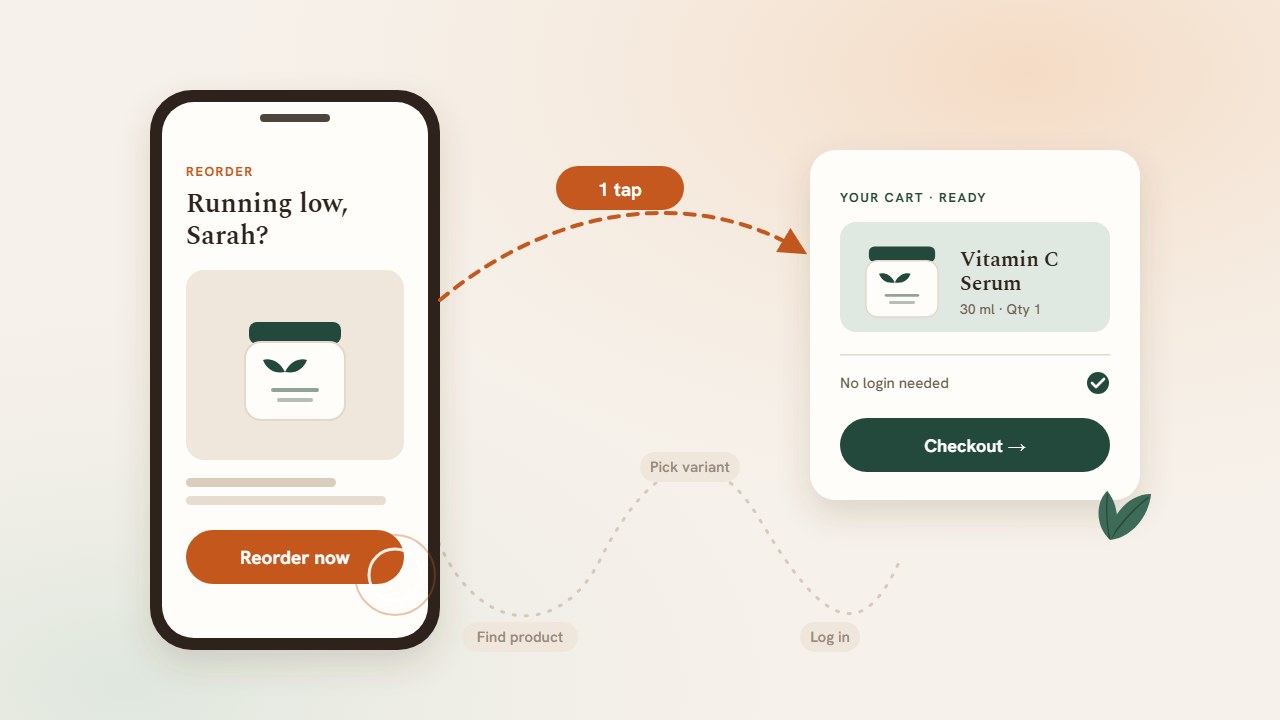
Your replenishment email gets opened. A decent share of people click. And then most of them never buy.
It is tempting to blame the subject line, the creative, or the offer, because those are the parts of the email you can see. But a reorder email is not a piece of content. It is the first step of a purchase, and most reorder flows break that purchase in two places: they arrive at the wrong time, and the click leads somewhere that makes the customer do work.
A customer who is genuinely running low on their serum, coffee, or supplements does not need persuading. They need the product in front of them, at the moment they need it, with nothing in the way. This guide covers why reorder emails underperform and what a high-converting reorder path looks like on Shopify.
AI insight extraction
Reading article context…
Key takeaways
- The leak is after the click, not before it. Opens and clicks look healthy because reorder intent is real. Conversion collapses when the click lands on a homepage, a collection, or an empty cart.
- Every step between the email and checkout costs buyers. Finding the product, choosing the variant, logging in, and rebuilding the cart are each a chance to leave.
- A fixed “day 30” send is wrong for most of the list. Customers reorder on their own rhythm, so a single schedule reaches many of them too early and some too late.
- The click should open a pre-filled cart. It should hold the customer’s own product, need no login, and hand off to standard Shopify checkout.
- Measure the path, not just the email. Track sessions, checkouts started, and purchases on the reorder cart so you can see exactly where buyers drop.
The reorder email conversion problem
Reorder emails have unusually high intent and unusually leaky conversion. The customer already knows the product, already trusts the brand, and is plausibly running out. That is why opens and clicks often look fine. A reminder about something you actually use is welcome.
The trouble is what the dashboard in your email platform does not show you. Email reporting ends at the click. Everything after it, from the landing page to the checkout, happens on your storefront, and that is where most of the drop-off sits.
Walk through the path a typical reorder click takes:
- The customer taps “Reorder now.”
- They land on the homepage or a collection page.
- They search or scroll for the product they bought.
- They pick the right size, scent, or flavor, ideally the one they had last time.
- They add it to the cart and open the cart.
- They are asked to log in, or they type their details at checkout.
- They pay.
Seven steps for a purchase the customer had already decided to make. Each one gives them a chance to get distracted, to doubt that they picked the right variant, or to close the tab and “do it later.” Later often means Amazon, a pharmacy shelf, or a competitor that showed up in a search.
Why generic cart links fail
Most reorder emails send the click to one of three places, and each has its own failure mode.
| Where the click lands | What the customer has to do | Why it loses buyers |
|---|---|---|
| Homepage | Find the product from scratch | The email promised their product; the homepage shows yours. Navigation is a context switch. |
| Collection or product page | Choose the variant, add to cart, open the cart | Variant choice creates doubt (“was it the 50ml or 100ml?”). Adding to cart is a step they expected to skip. |
| Shopify cart permalink with no context | Check that the cart is right, then check out | It’s better, but it’s often unbranded and has no explanation. It may still assume a logged-in session. |
The common thread is that the customer is made to rebuild a decision they have already made. The email said “time to restock your Vitamin C Serum.” The landing experience should start from that sentence, not from your navigation menu.
The login wall
Login deserves its own mention. Many repeat customers on Shopify never created a password, or forgot it long ago. A reorder path that pushes them to log in to see order history or saved items is asking for a password reset in the middle of a purchase. Few people finish that detour.
The variant problem
CPG catalogs are full of variants: sizes, scents, flavors, strengths, pack counts. A customer who bought the unscented 2-pack may not remember that detail, and a product page with every option visible makes them guess. Guessing creates hesitation, and hesitation lowers conversion.
Timing is the other half of the problem
Even a perfect landing page cannot save an email that arrives at the wrong moment. Most replenishment flows trigger a fixed number of days after the last order, for every customer and every product.
Consider three customers who all bought the same 30-day supplement:
- Customer A reorders every 26 days. A day-30 email arrives after they have already reordered, or after they have bought elsewhere.
- Customer B reorders every 31 days. Day 30 is close to perfect.
- Customer C takes a few days off each week and reorders every 40 days. Day 30 feels early. They ignore it, and by the time they run out they have forgotten the email.
A single schedule is right for some of the list and wrong for the rest. The customers it misses do not just fail to convert. Some unsubscribe because they keep getting reminders they don’t need. Others never hear from you at the moment they would have bought.
The fix is to time each reminder to each customer’s own buying rhythm, based on their order history for that product, rather than a store-wide average.
What a high-converting reorder path looks like
A reorder message that converts has two jobs. It reaches the customer near the moment they are due, and it makes buying a single, obvious step.
1. Per-customer timing
The reminder should be triggered by the customer’s own history with that product. A store-wide average is not enough. Someone who reorders every 26 days should hear from you before day 26, not on day 30.
2. A pre-filled cart for that customer
The click should open a cart that already contains the exact product, and variant, the message is about. The customer should be able to review it, change the quantity if they want, and go straight to checkout.
3. No login required
The cart should work for anyone who clicks the link, whether or not they have an account password. Identity is already implied by the personalized link.
4. Your brand and your domain
The cart should look like your store, live on your store’s domain, and use your copy. A generic or third-party-looking page undoes the trust the email built.
5. Standard Shopify checkout
Payment should go through native Shopify checkout. Customers know it, it supports the payment methods they already use, and your existing checkout settings, taxes and shipping rules still apply.
6. A modest, optional offer
Replenishment customers are already planning to buy, so a discount here is often margin you didn’t need to give away. If you do include one, apply it automatically in the cart so the customer doesn’t have to find or type a code.
Common mistakes in reorder flows
Linking every CTA to the homepage. It’s the easiest link to add and the worst one to land on.
Treating all products the same. A 30-day supplement and a 90-day bag of dog food should never share a reminder schedule.
Over-discounting replenishment. A customer who is due to reorder will often buy without an incentive. Train them to expect 15% off every restock and you have cut your margin on purchases that were coming anyway.
Sending reminders after the customer already bought. If your flow doesn’t exit customers who reordered between the trigger and the send, you’ll remind people about something they just bought. It looks careless.
Measuring at the click. Click-through rate tells you the email worked. It tells you nothing about whether the landing experience worked.
How to measure reorder conversion properly
Reorder performance should be measured as a funnel from the click to the purchase, not as an email metric.
| Metric | What it tells you |
|---|---|
| Sessions | How many customers opened the reorder cart from a message |
| Checkouts started | How many moved from the cart to checkout |
| Purchases | How many completed the order |
| Conversion rate | Purchases ÷ sessions, the health of the path itself |
| Revenue | Total purchase value from the reorder path |
If sessions are high but few checkouts start, the cart page is the problem: the content, the pricing, or the product shown. If checkouts start but don’t complete, look at shipping costs, payment options, or checkout settings.
Pro tip. Be strict about what you count as reorder revenue. Counting every purchase within 30 days of an email send inflates results with orders that would have happened anyway. Counting only purchases made through the link in the message is more conservative and easier to trust.
How Cadence handles reorders
Cadence was built around this exact path.
Timing. Cadence learns each customer’s buying rhythm from their Shopify order history, per customer and per product, and recalculates predictions every day. When a customer is due to replenish, Cadence sends a cadence_prediction event with prediction_type set to due_to_replenish to your connected marketing platform: Klaviyo, Omnisend, Attentive, or Postscript. Your own flow sends the email or SMS, with your creative.
The cart. Each event includes a cart_url that opens ConvertCart, a branded, login-free cart on your store’s domain, pre-filled with that customer’s product. The customer reviews it, adjusts the quantity if they want, and checks out through standard Shopify checkout. You control ConvertCart’s branding, copy per cart mode, and an optional Shopify discount code per prediction type.
Beyond email. The same prediction can reach customers through Nudges (on-site widgets shown to logged-in customers with an active prediction) and LiveBlock (a personalized block that appears in your regular newsletters only for recipients who have an active prediction).
Measurement. Cadence uses direct-path attribution. Revenue counts only when a customer clicks a ConvertCart link and completes checkout from that session. ConvertCart analytics show sessions, checkouts started, purchases, conversion rate, and revenue, so you can see exactly where the path leaks.
Frequently asked questions
What is a good conversion rate for reorder emails?
It depends heavily on your category, price point, and how you define conversion. Rather than chasing an external benchmark, measure purchases divided by sessions on your reorder landing experience and track how it changes when you remove steps. That number moves the most when you fix the path.
Should reorder emails include a discount?
Usually not by default. A customer who is due to restock already intends to buy. Keep discounts for customers who are drifting away, where an incentive actually changes behavior, and if you do discount replenishment, keep it modest and apply it automatically.
Can I use Shopify cart permalinks instead?
Cart permalinks are a big improvement on homepage links, because they pre-fill the cart. What they don’t give you on their own is per-customer timing, branded context explaining why the customer is there, or reporting on the path from click to purchase.
Does this work for SMS too?
Yes. SMS makes the landing problem worse, because people are on a phone and less patient with navigation and login. A one-tap, pre-filled cart matters even more there.
What to do next
Open your current replenishment email on your phone and tap the main button. Count the steps between that tap and a completed payment. If it is more than two (review the cart, then check out), that is your conversion problem.
Then look at your trigger. If every customer gets the same reminder on the same day, your timing is wrong for much of the list.
Cadence fixes both: per-customer timing, and a pre-filled, login-free cart behind every link. Book a 20-minute demo or install Cadence on Shopify.