You’ve built the flows. Replenishment, win-back, post-purchase, maybe a subscription nudge. The templates are on-brand, the segments are clean, and Klaviyo is doing exactly what you told it to.
The problem is what you told it. Most lifecycle flows run on a fixed schedule: every customer who bought product X gets the same email Y days later. Your customers don’t buy on a fixed schedule. The distance between those two facts is the repeat purchase window, and for a mid-size Shopify brand it can be worth tens of thousands of dollars a year.
This guide explains what the repeat purchase window is, why fixed-delay flows miss most of it, how to estimate what it is worth for your store, and how to fix the timing without rebuilding your marketing stack.
AI insight extraction
Reading article context…
Key takeaways
- The missing piece is per-customer timing, not better email design. A well-built flow sent on the wrong day still underperforms.
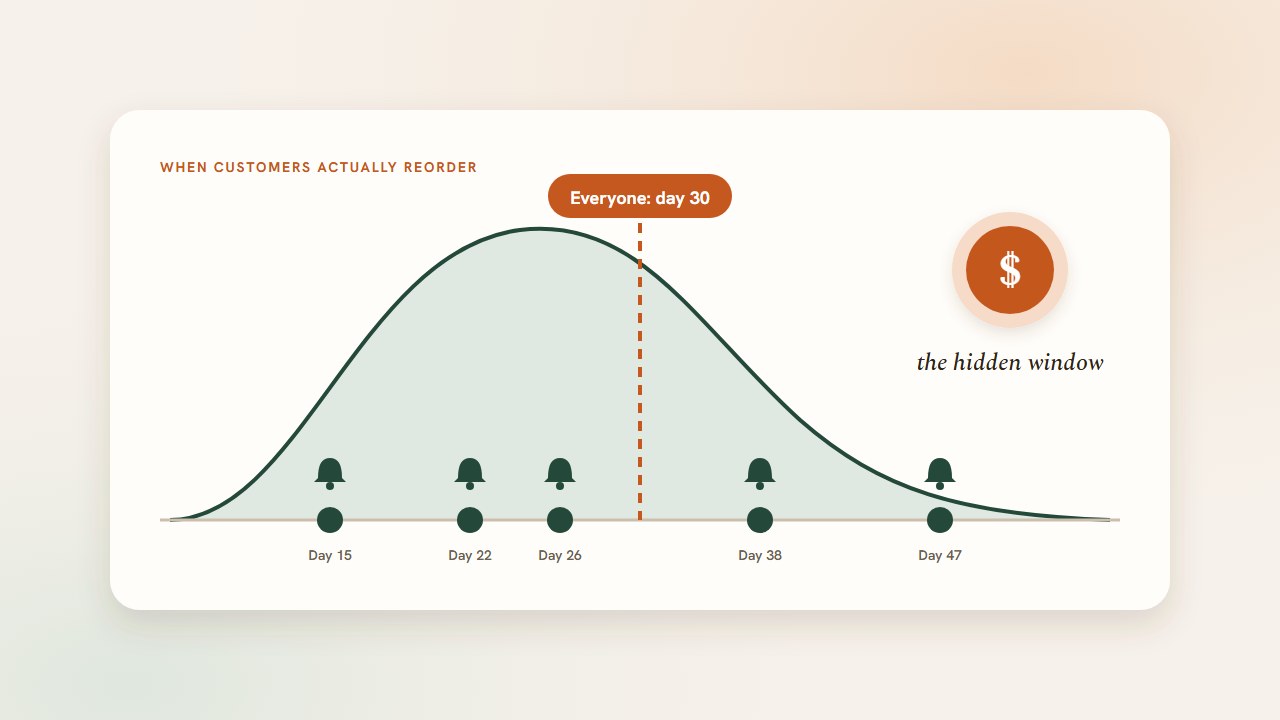
- Fixed delays fit an average customer who barely exists. Real reorder rhythms spread widely around the mean, so a single delay is early for some people and late for others.
- The value is easy to estimate. A small lift in repeat rate on an existing customer base adds up to five figures for a mid-size brand.
- You don’t need to replace Klaviyo. Trigger your existing flows when each customer is individually due, and pass them the product and cart context they need.
- Timing and friction compound. A well-timed email that links to a pre-filled cart converts far better than either fix alone.
Your Klaviyo flows are only half the equation
Klaviyo is excellent at what it does: it listens for a trigger, filters by segment, waits, and sends. What it can’t do by default is know when this customer is about to run out of this product. So most replenishment flows fall back on the simplest trigger available, Placed Order, followed by a time delay.
That design makes one assumption: everyone who buys the product reorders at roughly the same time. For consumables that is almost never true.
- A household of four goes through a coffee bag far faster than a single person.
- A customer who uses a serum every other night takes twice as long to finish it.
- A dog owner who mixes your food with another brand reorders on their own odd cycle.
Each of them is a good customer with a predictable rhythm. The rhythms just aren’t the same.
What the repeat purchase window is
For any customer and product, there’s a period when the next order is most likely. It’s when the last purchase is running out, but the customer hasn’t yet reordered or switched. That’s the repeat purchase window.
A reminder that lands inside the window feels useful. One that lands before it gets ignored, and too many of those lead to unsubscribes. One that lands after it arrives once the customer has already bought from Amazon, a pharmacy, or a competitor.
A fixed-delay flow puts one send date against thousands of different windows. It will hit some of them. The rest is the hidden revenue.
Why fixed schedules fail
Take a protein powder with a “30-day” tub and a replenishment email sent on day 30.
| Customer | Actual reorder rhythm | Day 30 email lands | Likely outcome |
|---|---|---|---|
| Daily user, trains hard | Every 20 days | 10 days late | Already reordered, or bought elsewhere |
| Daily user | Every 28 days | Just inside the window | Converts |
| Skips weekends | Every 38 days | 8 days early | Ignored, and forgotten by the time they need it |
| Shares with a partner | Every 15 days | Two cycles late | Most likely buying from someone else |
One flow, one delay, four different results. Only one of them is the result you designed for.
Brands often try to fix this by adding more emails: day 25, day 30, day 40. That catches a few more windows, but it sends three reminders to everyone, including people who don’t need them. The higher send volume shows up as list fatigue long before it shows up as revenue.
The $50K opportunity
You can estimate the value of better timing for your own store with simple arithmetic.
Take a mid-size Shopify brand:
- 10,000 active customers
- $75 average order value
- Customers who reorder do so about twice more per year
Suppose better timing moves 5% more of those customers into placing a repeat order (500 customers) and each places about two orders a year at $75:
500 customers × 2 orders × $75 ≈ $75,000 in additional annual revenue
Even if you only credit one extra order per recovered customer, that’s about $37,500. Somewhere between the two, roughly $50K a year, is a realistic picture of what generic timing can leave on the table for a brand this size. That comes from customers you’ve already acquired and paid for, not from sending more email.
Run the numbers with your own customer count, AOV, and order frequency. The point isn’t the exact figure. It’s that a few percentage points of repeat rate are worth more than most acquisition experiments you could run this quarter.
Making Klaviyo flows earn more
The fix is not to rebuild your flows. It’s to change what triggers them.
1. Trigger on “due,” not on “days since order”
Instead of starting a flow from Placed Order with a fixed delay, start it from a signal that says this customer is now due to reorder this product. The flow’s emails, branding, and segments stay the same. Only the start time changes, and it is now different for each customer.
2. Pass the product context into the flow
A timing signal is far more useful when it comes with details: which product, a link to it, and the customer’s name. Then a single flow template can personalize itself for every SKU in your catalog without separate flows per product.
3. Link to a cart, not a homepage
A well-timed email that lands on a homepage still loses buyers in navigation and login. Pointing the main CTA at a pre-filled cart for that customer turns good timing into an order.
4. Cover the other moments too
Replenishment is only one window. Customers also drift past their reorder point (lapse), become ready for a second product (cross-sell), or start reordering regularly enough to want a subscription. Each moment can trigger its own flow.
How Cadence works with Klaviyo
Cadence doesn’t replace Klaviyo. It provides the timing and context, and your flows do the sending.
- Learn. Cadence imports your Shopify order history and builds a buying rhythm for each customer and product.
- Predict. Every day, Cadence recalculates whether each customer is due to replenish, about to lapse, primed for cross-sell, or primed for subscription.
- Trigger. At your configured event delivery time, Cadence sends a
cadence_predictionmetric to Klaviyo withprediction_type,product_name,product_url,cart_url, and customer details. You build one flow per prediction type, each triggered by that metric and filtered onprediction_type. - Convert. The
cart_urlopens ConvertCart, a branded, login-free cart on your domain, pre-filled with the product, which checks out through standard Shopify checkout.
Cadence also syncs cadence_* profile properties to Klaviyo daily, such as cadence_due_to_replenish and cadence_replenishment_cart_url. You can use them to segment campaigns (for example, everyone due to replenish this week) or to show dynamic content. And the Cadence team can set up LiveBlock, a personalized block in Klaviyo Universal Content. You drop it into any newsletter, and it shows each recipient’s highest-priority prediction, or hides itself if they have none.
Your templates, your brand, your segments. Cadence changes when each flow starts, and where the click goes.
Cadence also works with Omnisend, Attentive, and Postscript in the same way, so SMS journeys can run alongside your Klaviyo email flows from the same predictions.
Common mistakes
Adding more sends to cover more windows. It raises volume and fatigue faster than revenue.
Building one flow per SKU. It doesn’t scale and still uses fixed delays. Use one flow per moment, personalized with product data.
Forgetting flow exits. Make sure customers leave the flow when they reorder, so nobody gets a reminder for something they just bought.
Measuring flow revenue with a generous attribution window. Crediting every purchase within days of an email inflates the result. Count purchases that came directly through the email’s cart link for a cleaner read.
Frequently asked questions
Can’t I just use Klaviyo’s predictive analytics?
Klaviyo’s predictive fields, such as expected date of next order, are useful at the customer level. What lifecycle flows usually need is product-level timing (which product is due) plus a ready-to-buy cart link, delivered as a trigger your flows can act on.
Do I need to rebuild my existing flows?
No. You change the trigger, from Placed Order plus a delay to the Cadence prediction metric, and insert the product and cart properties into your existing templates.
How quickly will I see results?
After enablement, Cadence generates predictions on its first daily cycle and events arrive at your next delivery time. Allow 24–48 hours for the first messages to reach customers, then judge results over at least one full reorder cycle.
What to do next
Open your main replenishment flow in Klaviyo and look at the trigger and the first time delay. If it’s “Placed Order → wait N days” for every customer, you’re running a fixed schedule against thousands of different repeat purchase windows.
See what per-customer timing could add to the flows you already have. Book a 20-minute demo or see how Cadence works with Klaviyo.